

Spark Performance Tuning: Master the Execution Hierarchy to Optimize Spark Jobs


Master spark performance tuning fundamentals that will transform how you debug and optimize spark jobs.
When your Spark job fails after running for hours, or when you're staring at the Web UI wondering why your data pipeline is so slow, the root cause almost always traces back to one thing: not understanding how Spark actually executes your code.
Most data engineers write transformations and actions without grasping what happens under the hood. But here's the reality: you can't optimize what you don't understand. Whether you're trying to figure out why your job is spilling to disk, why some executors sit idle, or why a simple aggregation takes forever, it all comes down to Spark's execution model. This is true whether you're running on EMR, Databricks, or any other platform.
Let's break down Spark's hierarchical execution structure so you can apply effective spark performance tuning, debug issues in minutes instead of hours, and finally make sense of what you see in the Spark Web UI (and in DataFlint's OSS Job Debugger).
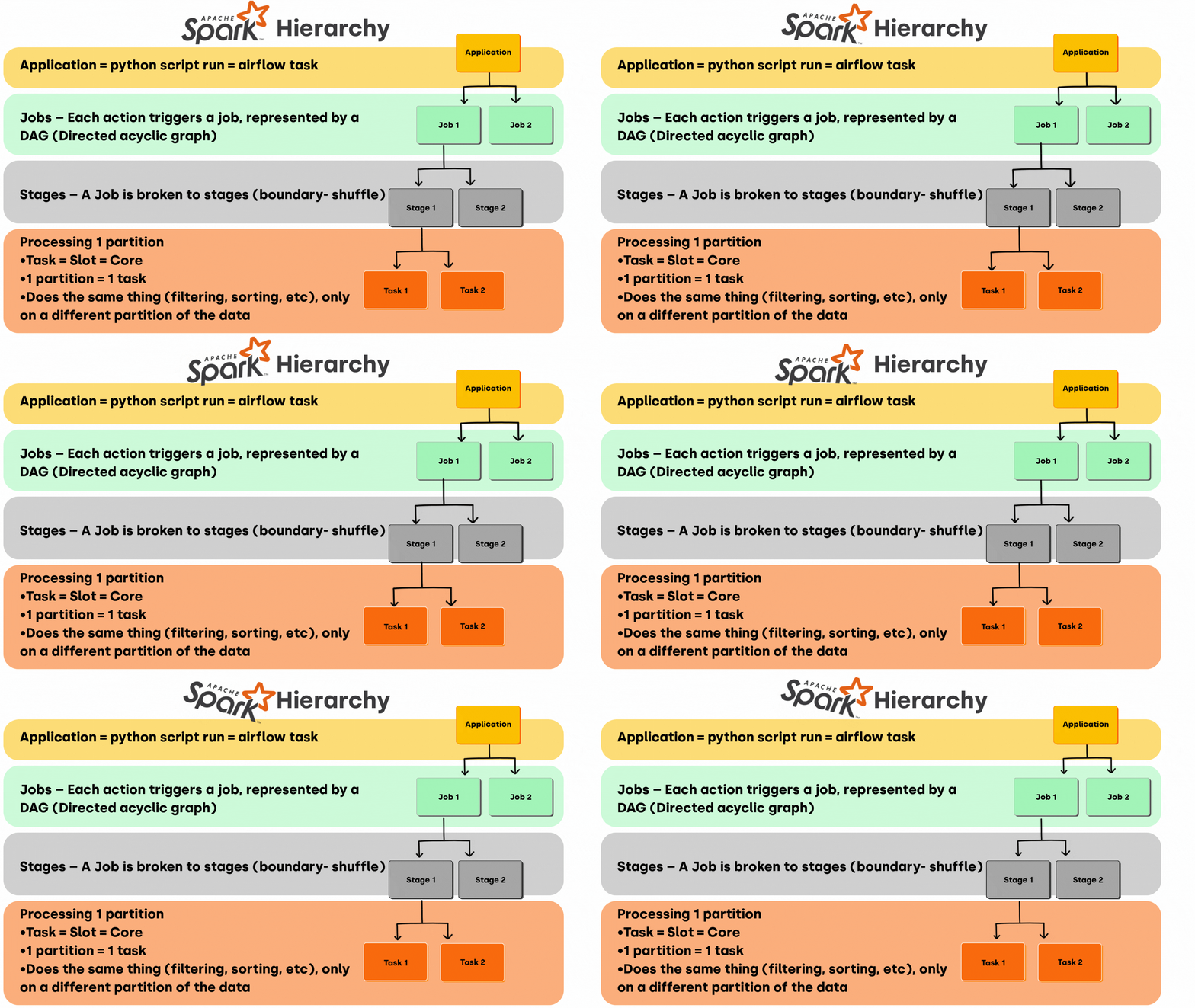
Spark's execution hierarchy: Application → Jobs → Stages → Tasks
The Spark Execution Hierarchy: Four Levels You Need to Know for Spark Performance Tuning
Spark breaks down your data processing job into progressively smaller units. Understanding this hierarchy is the key to effective spark DAG optimization and data pipeline optimization.
1. Application: Your Entry Point
At the top sits your Spark Application. This is simply the script you're running. Whether it's a PySpark script triggered by Airflow, a Scala program, or a notebook cell, this is the container for everything else.
One application can spawn multiple jobs depending on how many actions you trigger. This matters because each action kicks off a new round of computation.
2. Jobs: Triggered by Actions
Every time you call an action in Spark (count(), collect(), write.parquet()) you create a new Spark Job. This is crucial to understand: transformations like filter() or map() don't execute anything. They're lazy. Jobs only materialize when you call an action.
Each job is internally represented as a Directed Acyclic Graph (DAG) that Spark's DAG Scheduler uses to plan execution. Understanding this is fundamental to spark DAG optimization.
Why this matters for debugging:
DataFlint's AI Copilot highlighting feature helps you map query plan operators directly to your source code. When you see multiple jobs in the plan, you can instantly identify which lines of code triggered them. This makes it easy to spot unnecessary actions that force redundant computation and waste compute resources.
3. Stages: Where Shuffles Happen (Key to Spark Shuffle Optimization)
Jobs are divided into Stages, and the boundaries between stages are determined by shuffle operations. Understanding stages is critical for spark shuffle optimization. Shuffles occur during wide transformations (operations that require redistributing data across executors):
groupByKey()reduceByKey()join()repartition()
Shuffles involve moving data across the network and often writing to disk. They're expensive, which is why stage boundaries matter so much for performance.
Why this matters for spark shuffle optimization:
When you see a slow stage in DataFlint's real-time data pipeline monitoring, you're looking at a shuffle bottleneck. The stage-level metrics DataFlint surfaces (shuffle read/write volumes, spill metrics) tell you exactly where your performance problems are. Spark join optimization through broadcast joins can dramatically improve runtime.
4. Tasks: The Actual Work Units
At the lowest level are Spark Tasks, the units of work assigned to individual cores. Here's the fundamental equation:
1 partition = 1 task
Each task processes exactly one partition of your data on one core. All tasks within a stage perform the same operation (filtering, aggregating, etc.), just on different chunks of data.
Why this matters for performance:
Your partitioning strategy directly determines parallelism. Too few partitions? You're underutilizing your cluster. Too many? You're creating overhead. DataFlint's resource tab shows you task distribution across executors, making it easy to spot imbalanced workloads or idle cores.
The ideal target: 2-3 tasks per CPU core in your cluster.
How This Impacts Real-World Spark Performance Tuning
Understanding the execution hierarchy isn't academic. It directly translates to faster jobs, lower costs, and significant databricks cost optimization or EMR savings.
Job-Level Optimization
Multiple actions create multiple jobs. If you're recomputing the same DataFrame multiple times, you're burning money. DataFlint's summary view shows you all jobs in your application, making it obvious when you need to add .cache() or .persist() to avoid redundant computation.
Stage-Level Optimization (Spark Shuffle Optimization)
Each stage boundary represents a shuffle. When DataFlint flags a stage with excessive shuffle write, you know you need to apply spark shuffle optimization. Common fixes for spark join optimization:
- Use broadcast joins for small tables (key spark join optimization technique)
- Repartition strategically before expensive operations
- Coalesce after filtering to reduce partition count
Task-Level Optimization
Partition skew is the silent killer of Spark performance. When one task processes 10GB while others process 100MB, that slow task becomes your bottleneck. DataFlint's heat map visualization instantly shows you task duration distribution, highlighting skew before it kills your SLA.
Spark Monitoring Tool: Seeing It All in the Web UI (and DataFlint)
The native Spark Web UI maps directly to this hierarchy:
- Jobs tab: Lists all jobs triggered by actions
- Stages tab: Shows stages within jobs, with shuffle metrics
- SQL/DataFrame tab: Displays the physical execution plan

Simply click the "DataFlint" tab in your Spark Web UI to access the enhanced interface
But let's be honest: the native UI is difficult to navigate. You're constantly refreshing, hunting through verbose tabs, and interpreting cryptic operators. For effective spark SQL optimization or spark query optimization, you need better tooling.
This is exactly why we built DataFlint, the first AI Copilot for Apache Spark. Instead of decoding raw metrics, you get:
- Real-time pipeline monitoring with live updates as your job runs, showing each stage's status and performance in a clean, readable format.
- Instant root cause identification through our heat map that highlights slow operations in red, enabling faster spark query optimization.
- Actionable alerts that don't just tell you what's wrong, but tell you how to fix it with specific code changes for spark SQL optimization.

Real-time query visualization with live updates and clear operation flow
For example, when DataFlint detects that you're writing 5,000 small files, it doesn't just flag the issue. It tells you to add .coalesce(N) before your write operation and explains why this will improve both write performance and subsequent read performance.
Connecting Theory to Practice with DataFlint
Let's trace a real debugging scenario:
- Job fails after an hour. You open DataFlint's Dashboard and immediately see which job failed and at what stage.
- Drill into the root cause. Using the Job Debugger, the query plan visualization reveals a shuffle-heavy aggregation. The Alerts tab flags a "Partition Skew" warning, pinpointing the exact SQL query and node, showing the skew ratio and median vs max task durations. DataFlint suggests specific fixes: repartition your data differently, or reduce executors/cores to minimize waste.
- Apply the fix in your IDE. Using the IDE Extension, type
/dataflint-copilot/optimizeto get context-aware code suggestions based on your actual production data. The AI Copilot implements the fix, adding a salting technique or repartitioning by a different column. - Job runs in 15 minutes instead of failing after an hour.
This is the power of understanding Spark's execution hierarchy combined with AI for data engineering. You move from trial-and-error to methodical big data optimization.
Spark Performance Tuning Takeaways for Data Engineers
Whether you're debugging a failing job or applying data pipeline optimization, understanding Spark's execution model gives you:
- Faster debugging: Isolate issues to the right level. Is this a job-level caching problem, a stage-level shuffle issue, or task-level skew?
- Better code: Design transformations with awareness of how they translate into stages and shuffles for optimal spark performance tuning.
- Databricks cost optimization: Configure executors and partitions based on your actual workload characteristics, not guesswork. Same applies for EMR and other platforms.
- Clear communication: Discuss performance issues with your team using precise terminology that maps to Spark's actual execution.
DataFlint amplifies these benefits by surfacing the right information at the right time. Our Job Debugger & Optimizer transforms the execution hierarchy from an abstract concept into a visual, interactive debugging tool. Our Dashboard gives you fleet-wide visibility across all your jobs. And our IDE Extension brings AI-powered optimization directly into your development workflow.
Stop treating Spark as a black box. Master the execution hierarchy, leverage the right tools, and watch your job performance (and your productivity) transform.
Ready to see how DataFlint makes spark performance tuning and data pipeline optimization effortless? Book a demo and experience our data observability platform for yourself.