

The Bug That Was Breaking Our SLA
Every Peak Hour and How a Spark Agent
Traced It


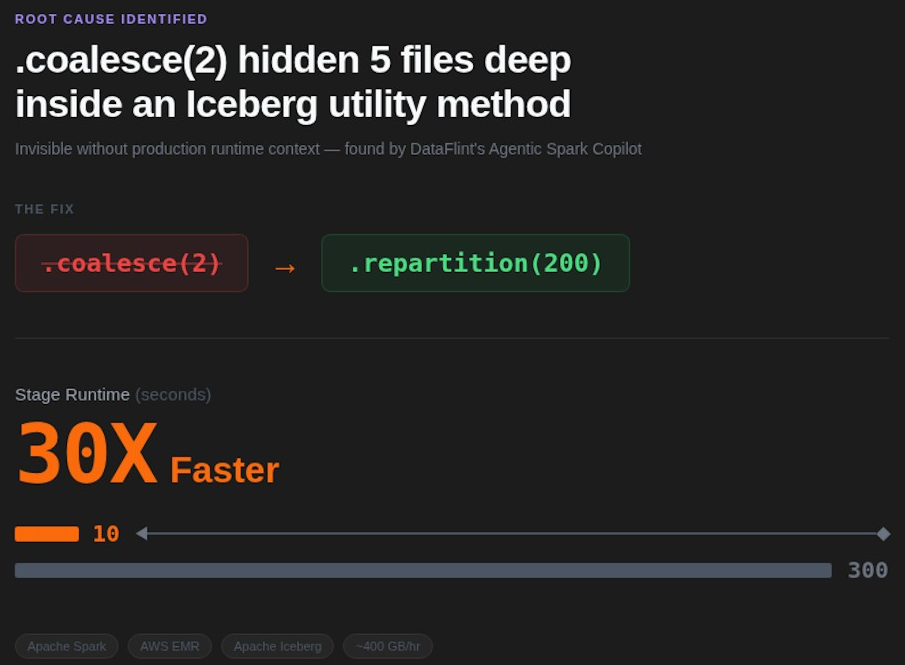
A bug buried 5 files deep was crashing our pipeline at 3AM. No log would have found it. An agentic Spark copilot did.
The impact of changing a single line: coalesce(2) to repartition(200)
Company: Natural Intelligence (NI), one of Israel's leading performance marketing companies
Stack: Apache Spark on AWS EMR, Apache Iceberg,
Problem: ~400 GB/hour. Hourly EMR Spark pipeline breaching SLA, then crashing with OOM at 3AM
Fix: One line change: coalesce(2) → repartition(200)
Result: Stage runtime dropped from 5 minutes to 10 seconds (30x improvement)
The Problem: An Hourly EMR Spark Job That Couldn’t Keep Up
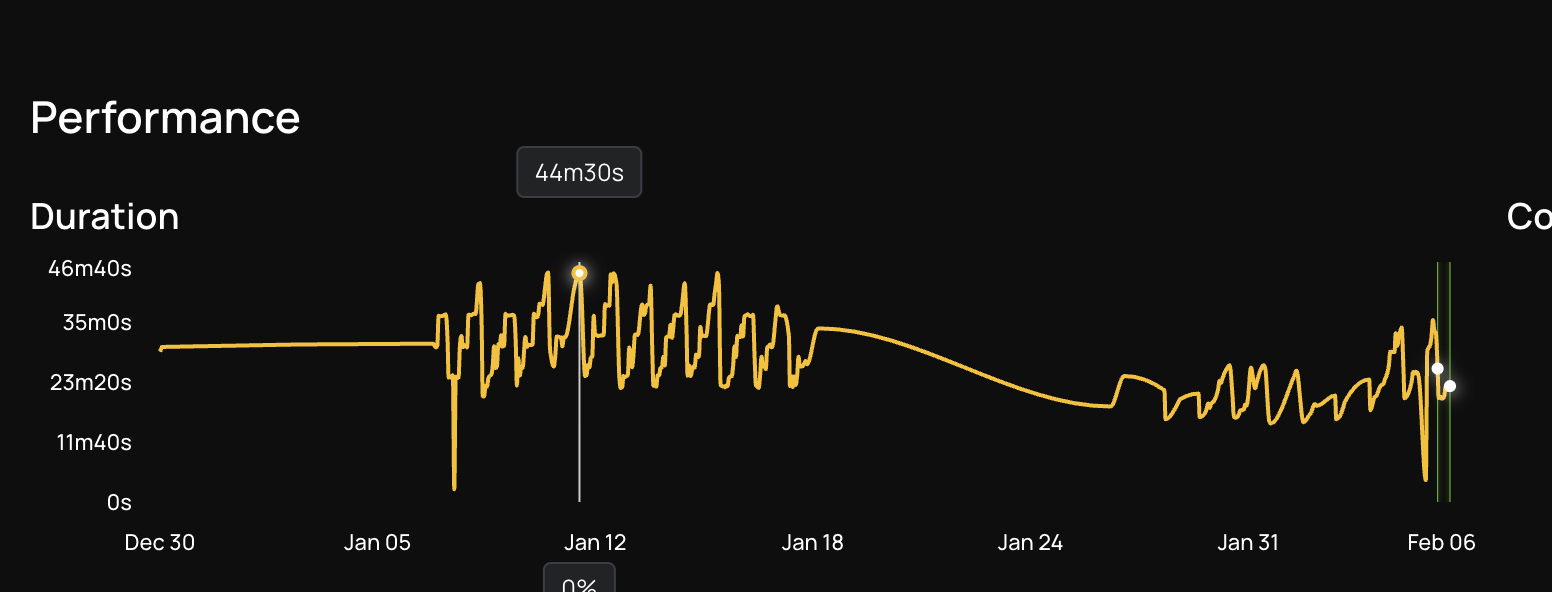
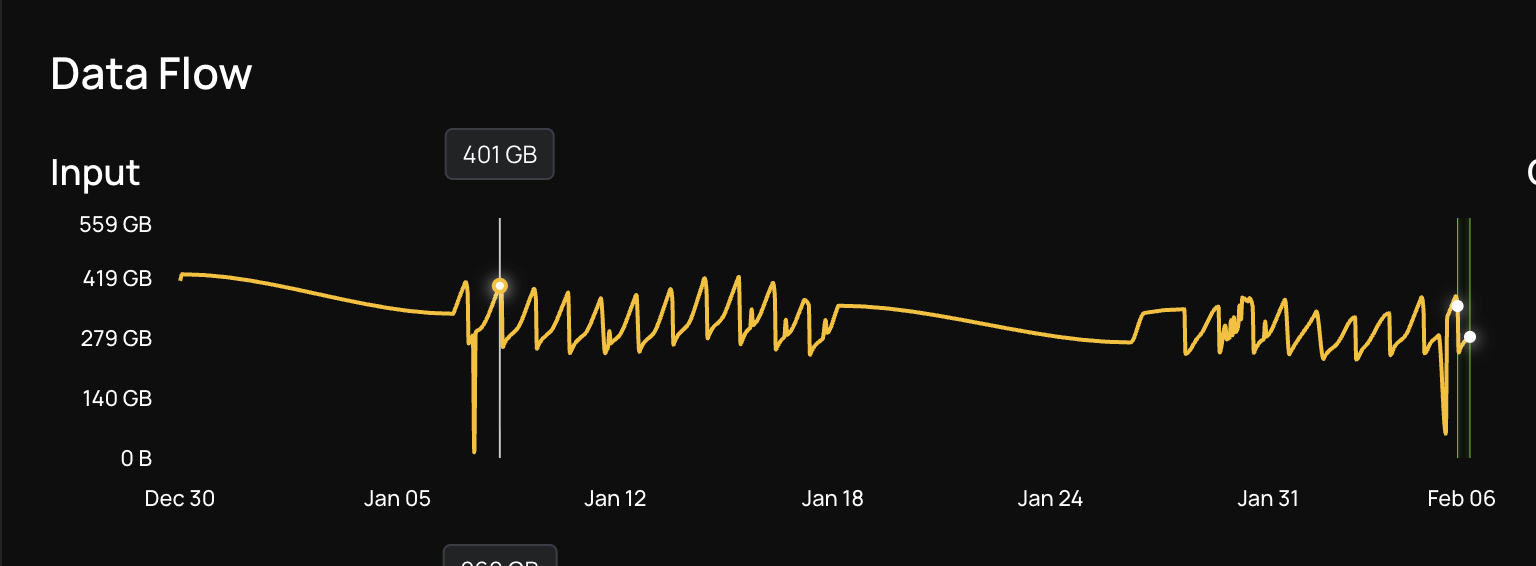
At Natural Intelligence, we run dozens of Apache Spark pipelines on AWS EMR to process hundreds of gigabytes of data every hour. Our pipeline called "in sites" runs every hour and processes incremental data using Apache Spark on AWS EMR, with Apache Iceberg as the storage layer. At peak hours, it ingests ~400 GB/hour. The SLA is 30 minutes. Miss that, and the next run stacks up, creating a cascade of delays. For most of the day, the job ran fine. But during peak traffic hours, runtime climbed to 44 minutes. They tried the obvious Spark optimization fix: adding more instances to the cluster. It made no difference. The job ran just as slowly with more machines as it did with fewer. That was the first sign that the bottleneck wasn't about raw compute. It was somewhere deeper.
First Attempt: Open-Source Spark MCP
Before DataFlint, we tried using the open-source MCP server for Apache Spark History Server to diagnose the issue with AI assistance. We invested several days writing and refining prompts, feeding it stage details and executor logs, hoping the AI would spot the bottleneck. The best we got back were generic suggestions like "increase executor memory" and "add more partitions," advice that sounded reasonable but didn't address the actual problem.
The fundamental issue was that the tool lacked the context it needed to give useful answers:
- No index across all applications, environments, teams, and domains, so it couldn't compare runs or spot regressions
- Could only look at one run at a time, making it impossible to correlate performance with data volume trends
- No IDE integration to highlight the slow parts directly in the code, requiring engineers to manually cross-reference stage IDs with source files
- No way to correlate bottlenecks to the actual transformations and specific lines in the code, especially challenging with a large Scala codebase powering a single ETL job
We needed something that could see the full production context, not just the Spark History UI data, and connect it back to our codebase.
Enter DataFlint: Production-Aware AI for agentic Spark Performance Optimization
DataFlint is a Spark copilot built around production context. Unlike generic AI assistants that only see code, DataFlint can see real Spark physical plans, actual data distribution, cluster utilization, and runtime metrics, and use that context to propose fixes that are correct for the real environment. It integrates directly into the IDE (NI uses Cursor) via MCP, so the AI has full awareness of both the code and the production behavior.
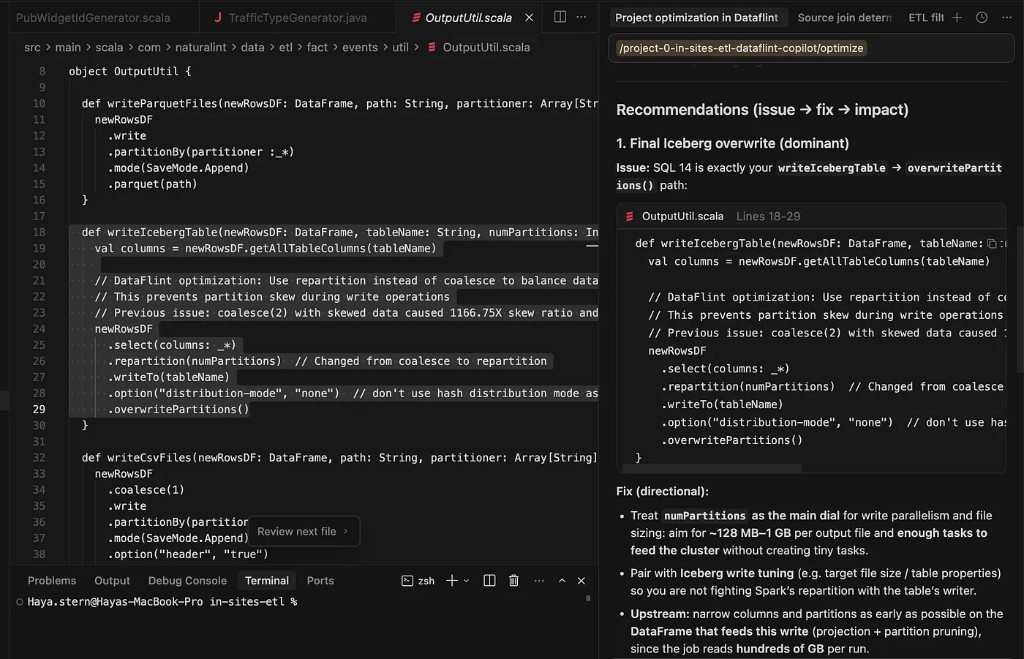
On the day we onboarded, DataFlint ingested our job history and immediately flagged four issues on the "in sites" pipeline:
- Core underutilization
- Partition skew with straggler tasks
- Inefficient sort merge joins
- Too many small tasks from uncompacted tables
But one of these issues turned out to be far more critical than we expected.
Digging Into the Root Cause
Step 1: Cluster Underutilization
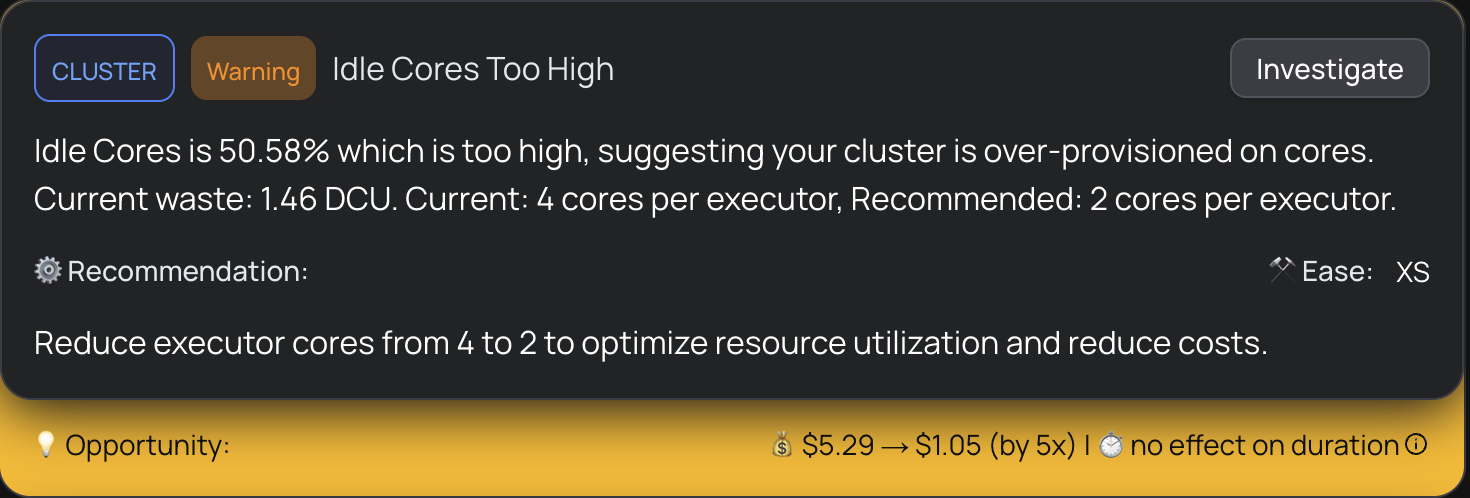
DataFlint's first alert was striking: the cluster was only 3% utilized. Dozens of cores were available, but the vast majority were sitting idle during the most expensive stage of the pipeline. This explained exactly why scaling up the cluster didn't help. The job wasn't bottlenecked on capacity, it was bottlenecked on parallelism.
Step 2: The Parallelism Bottleneck
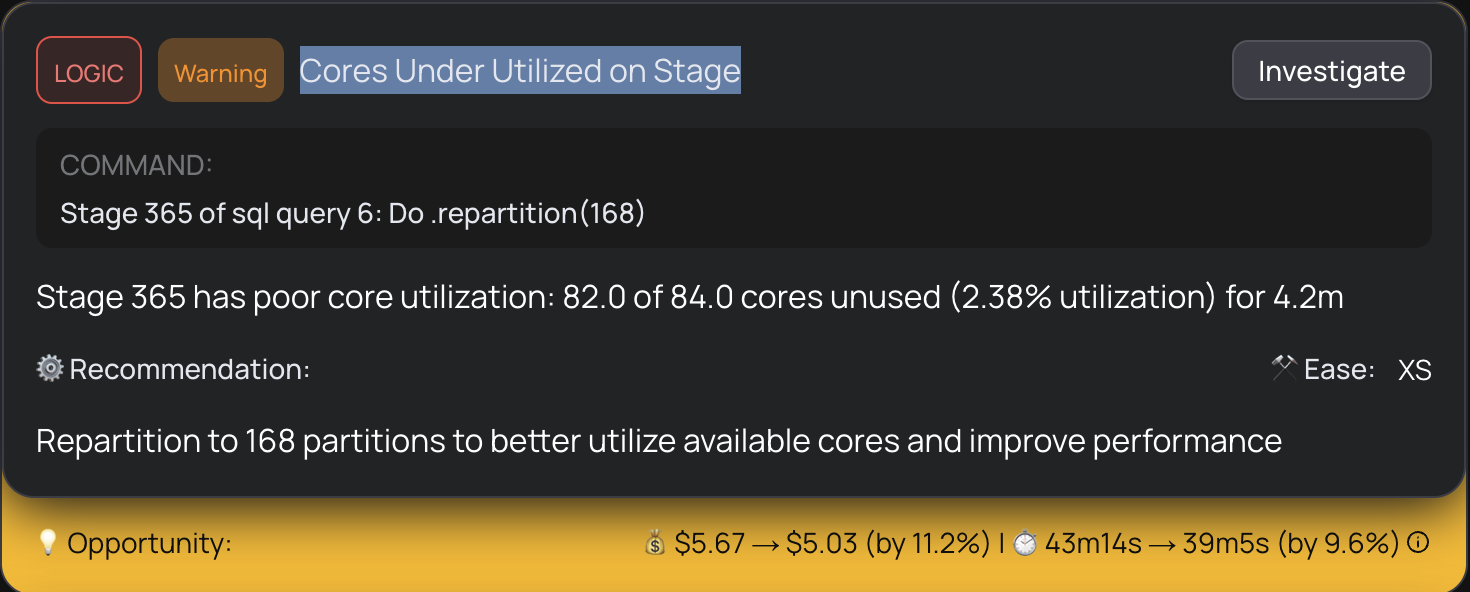
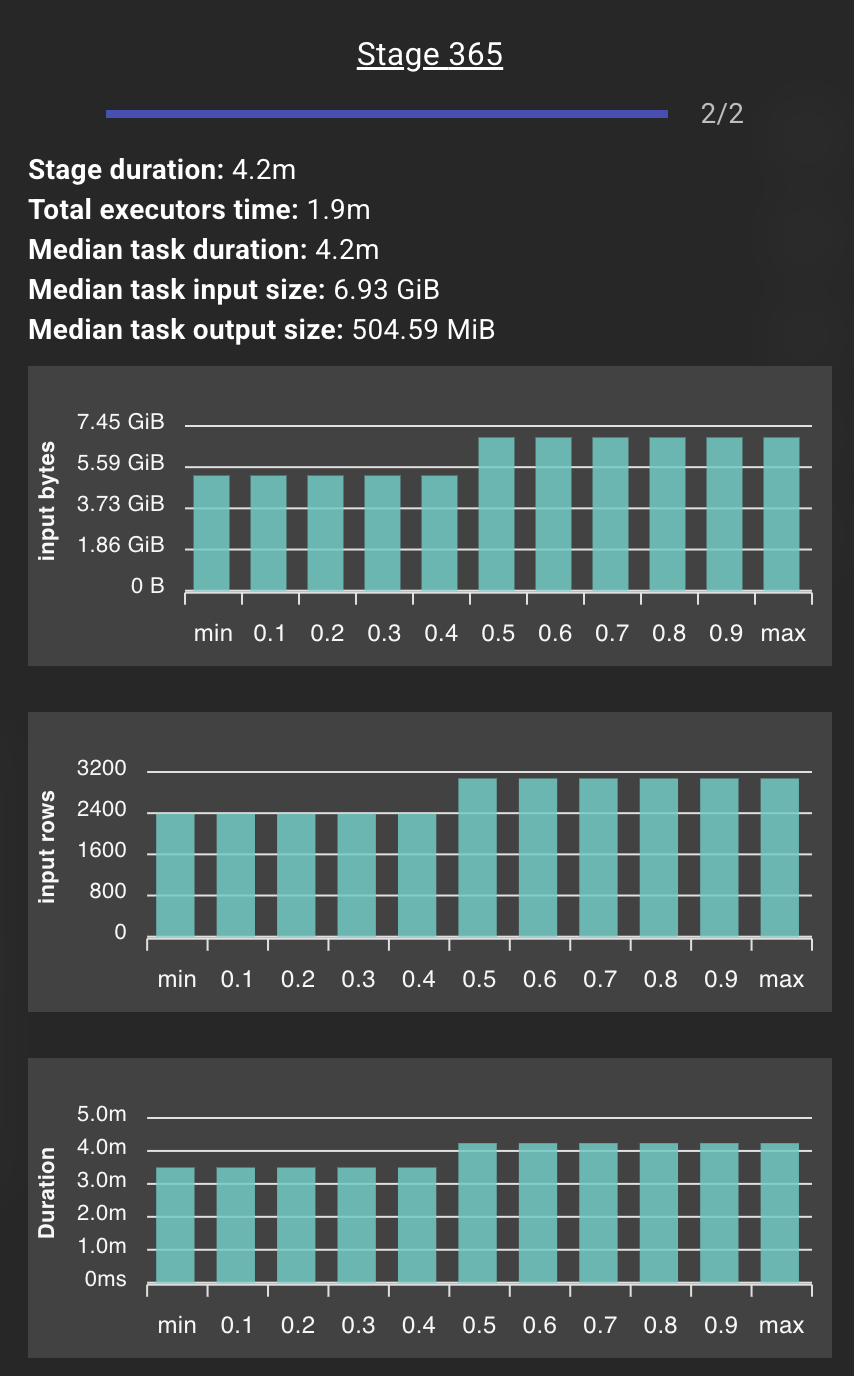
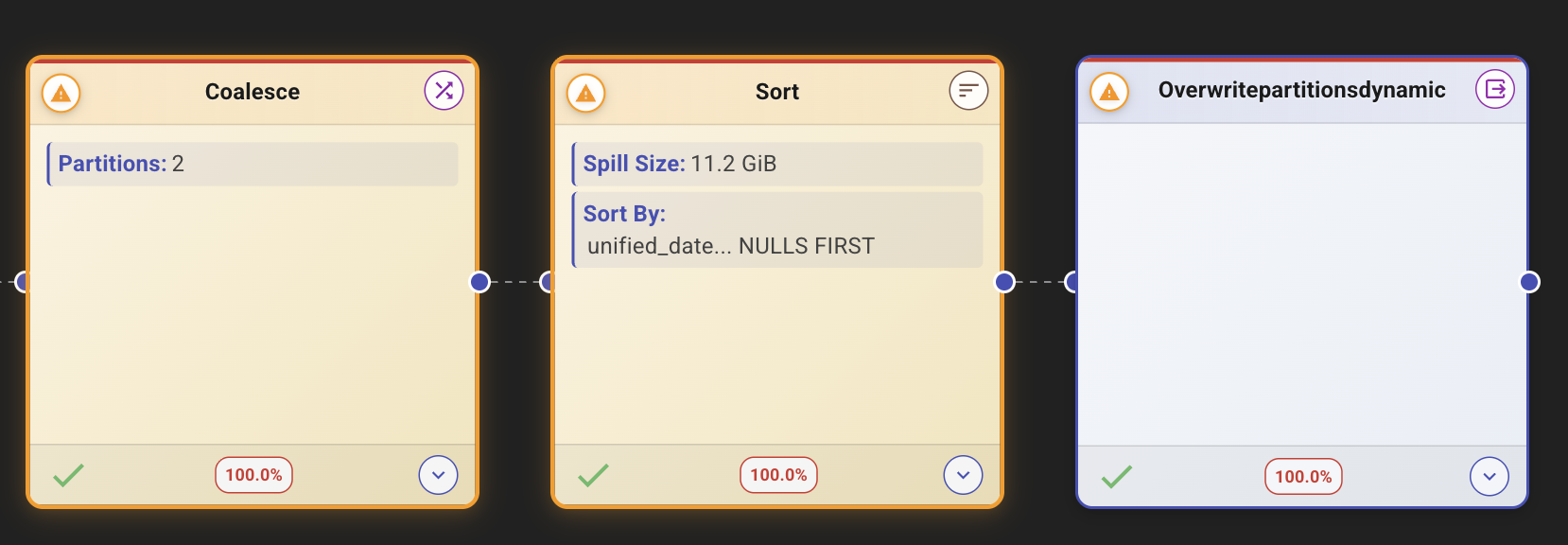
Drilling deeper, DataFlint showed that one specific stage had collapsed into just 2 tasks, processing a massive amount of data on only 2 cores while the rest of the cluster waited. This created enormous partitions of 6.93 GiB each, which caused large memory spills and extreme task durations. The tasks were so large that any data skew at all would create a straggler dominating the entire stage.
Step 3: The Hidden Coalesce, 5 Files Deep
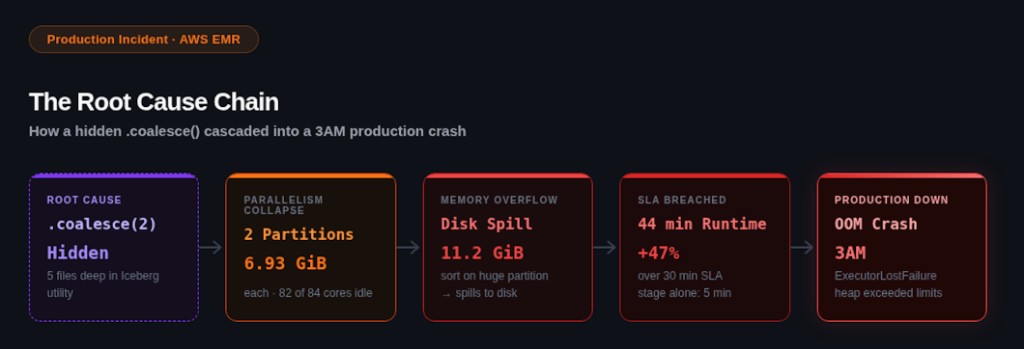
The root cause was a .coalesce(2) call that ran before the write operation. But here's what made it so hard to find: this coalesce wasn't in NI's job code. It was buried inside an internal Iceberg utility method, 5 methods and 5 files deep from our main class.
DataFlint's agentic Spark copilot traced through the Spark execution plan and pinpointed the exact line. The coalesce was reducing the partition count to 2 right before a sort-and-write operation. This meant Spark had to sort the entire dataset across just 2 partitions, creating massive memory pressure and 11.2 GiB of spill.
Why Coalesce Before Iceberg Writes Is Dangerous
This is worth understanding in detail, because it's a subtle but common Iceberg write optimization pitfall that affects many Spark pipelines.
Coalesce vs. Repartition in Apache Spark
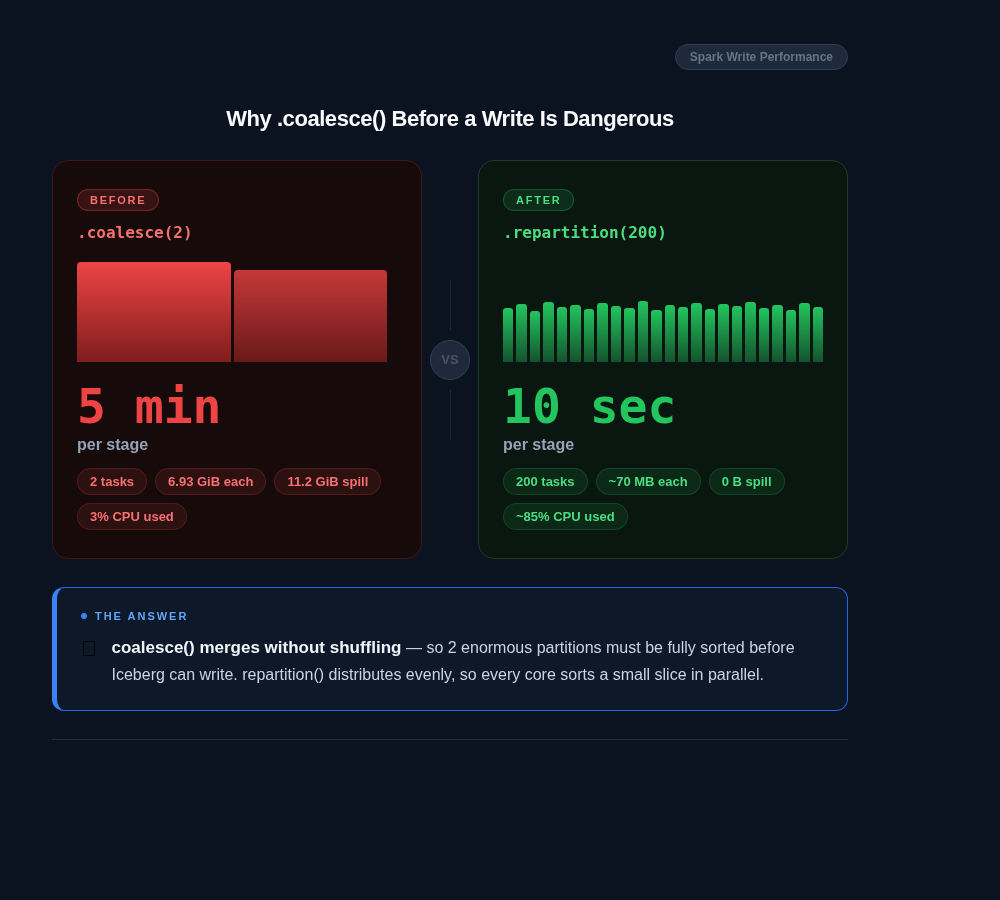
coalesce(N) reduces the number of partitions without a shuffle. It does this by merging partitions on the same executor, which means the resulting partitions can be wildly uneven in size. When N is very small (like 2), you end up with a tiny number of enormous partitions.
repartition(N) performs a full shuffle to redistribute data evenly across N partitions. It costs more network I/O, but the resulting partitions are balanced.
When you coalesce to a small number before writing to Iceberg, Spark must then sort the data within each partition for Iceberg's ordered writes. Sorting a massive, unbalanced partition is extremely expensive: it spills to disk, takes enormous amounts of memory, and creates straggler tasks that dominate the entire job's duration.
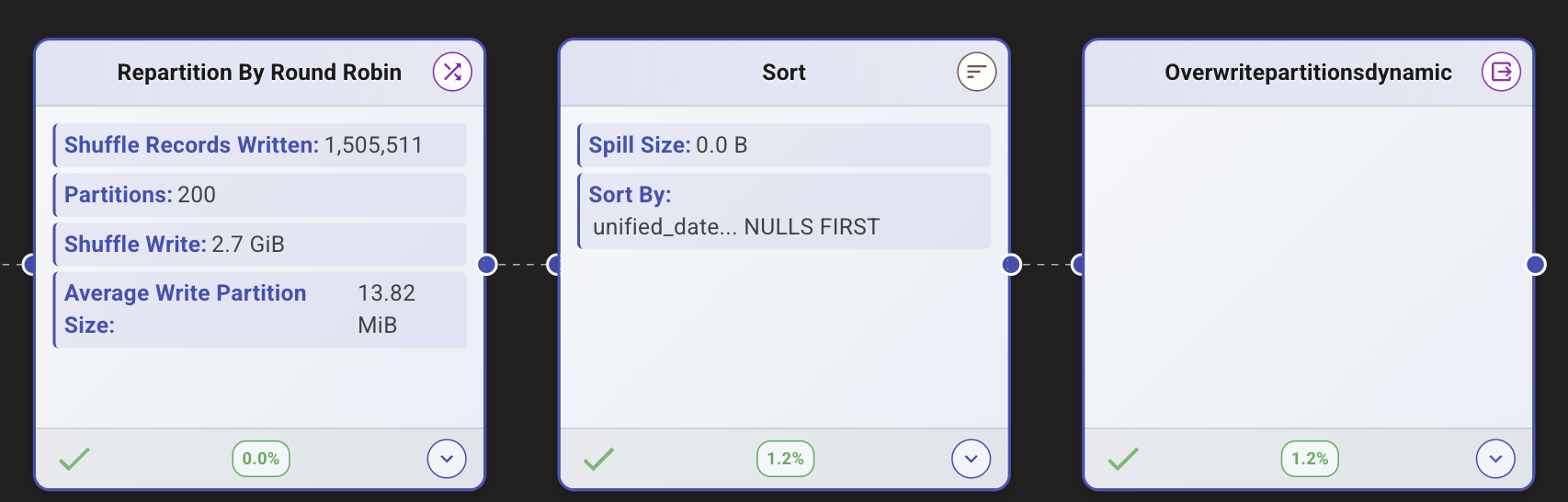
The fix: Replace coalesce(2) with repartition(N) where N matches the desired level of parallelism. This distributes the sort work evenly across the cluster instead of piling it onto 2 tasks.
A Note on Iceberg’s Distribution Mode
Apache Iceberg provides a write.distribution-mode setting that attempts to handle data distribution automatically before writes. When enabled, Iceberg adds its own repartitioning step to organize data by partition key before writing. While this solves the "too few partitions" problem, it comes with a performance cost: Iceberg performs this redistribution on every write, even when the data is already well-distributed. For high-frequency pipelines like we have that run hourly, this overhead adds up. Understanding the trade-off between write-time cost and read-time file organization is critical when tuning Iceberg write performance on EMR or Databricks.
The Production Incident
While we were still investigating in our staging environment, the issue escalated. The "in- site" production pipeline started failing with OOM errors at 3AM. We investigated and searched for data skews, but couldn't find an obvious cause in the data itself.f.

The root cause was the same coalesce issue DataFlint had already identified weeks earlier and that had been partially fixed in staging. Under increased data volume, the memory pressure from sorting those massive partitions finally exceeded the executor memory limits, causing the crash.
Using DataFlint's AI Copilot, our team located the problematic coalesce line, buried in an Iceberg utility class they didn't author, and applied the repartition fix directly to the failing production job the same day.
The Fix and Its Impact
After applying the fix, the exact same code ran the problematic stage in 10 seconds instead of 5 minutes, a 30x improvement from a single-line change.
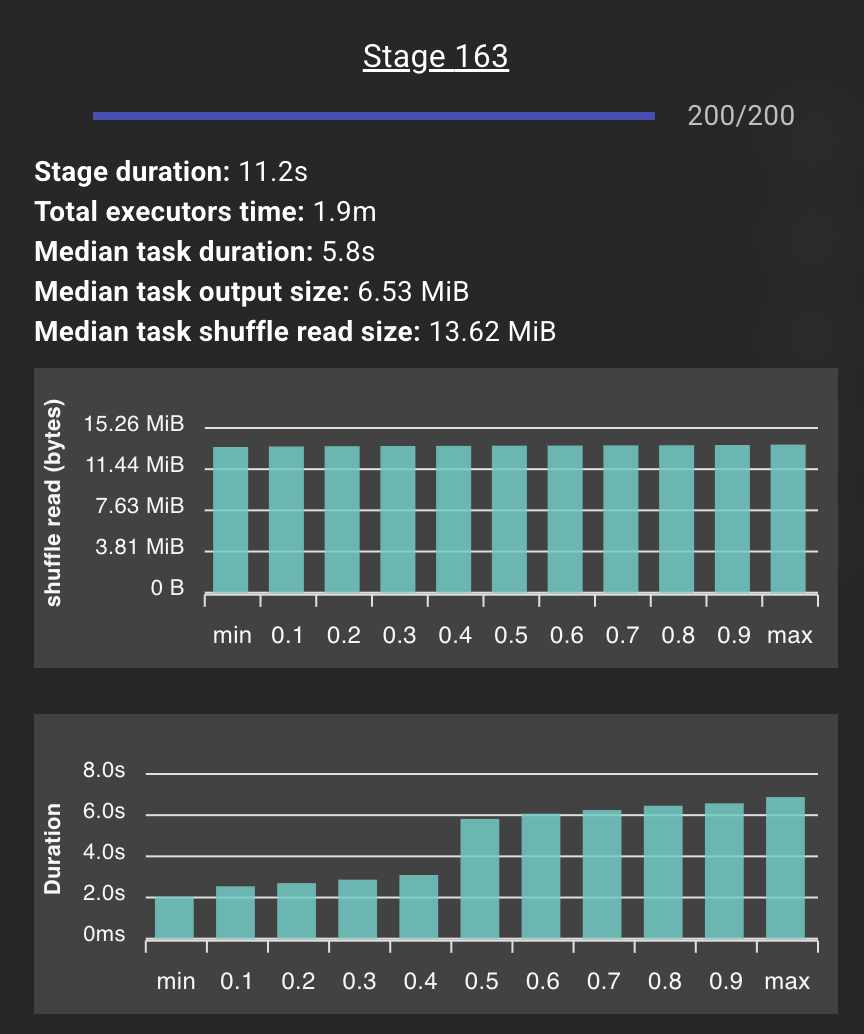
Our engineering team confirmed the impact in production:
“I tried the version with the broadcast and looks like almost 20% improvement! And it is even more because it was running later — means bigger input. We’ll run this version for the night to make sure the improvement is consistent.”— Haya Stern, Natural Intelligence Data Engineering Team
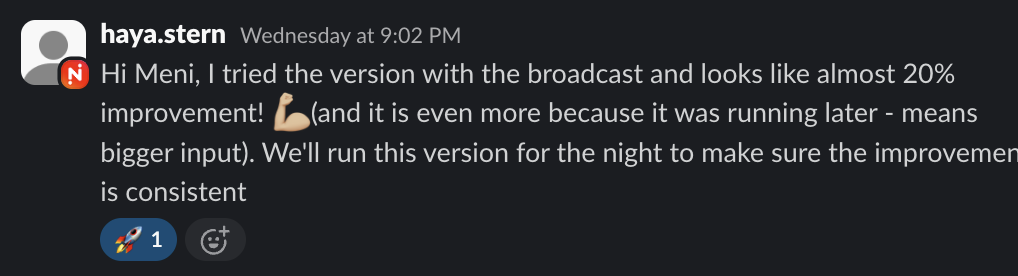
Impact Summary
| Metric | Before | After |
|---|---|---|
| Write Stage Duration | 5 minutes | 10 seconds |
| Tasks in Stage | 2 (of 84 cores) | 200 (full parallelism) |
| Spill Size | 11.2 GiB | 0 B |
| Core Utilization | 2.38% | 100% |
| Overall SLA | 44 min (breach) | ~25 min (20% improvement) |
| Production Stability | OOM crashes | Zero failures |
Additional Optimizations: Fixing the Cascade
The coalesce fix was the most impactful single change, but DataFlint identified a cascade of related issues the team continued to address. The partition skew from the coalesce was cascading through downstream stages. Uneven partitions at the write stage meant uneven shuffle reads for everything that depended on that data. Fixing the root coalesce resolved much of this cascade automatically, but several independent issues remained.
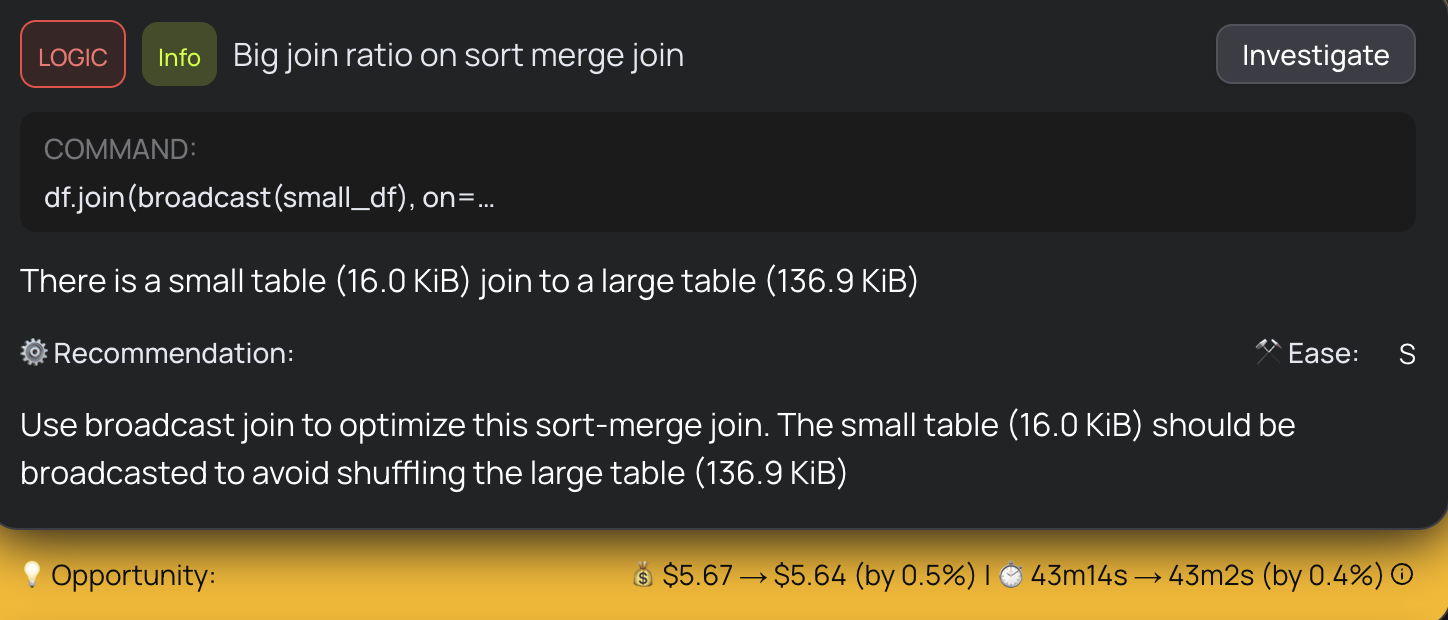
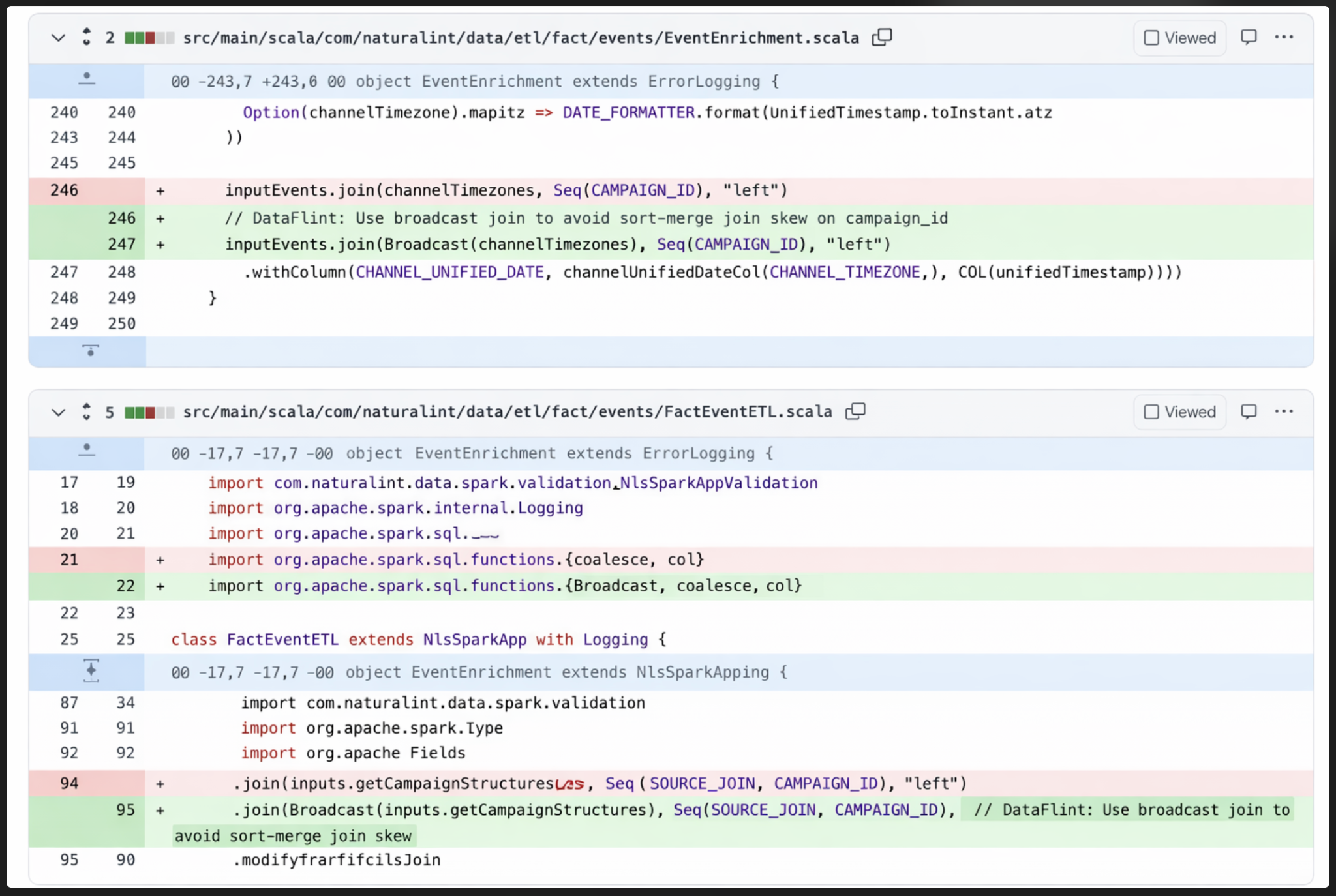
- Broadcast joins: Some sort-merge joins were operating on highly asymmetric tables. A small table of 16 KiB was being sort-merge joined to a large table, a clear candidate for broadcast join optimization. Switching to broadcast joins for the smaller sides eliminated unnecessary shuffles and sorts, a common Spark join optimization that DataFlint flagged automatically.
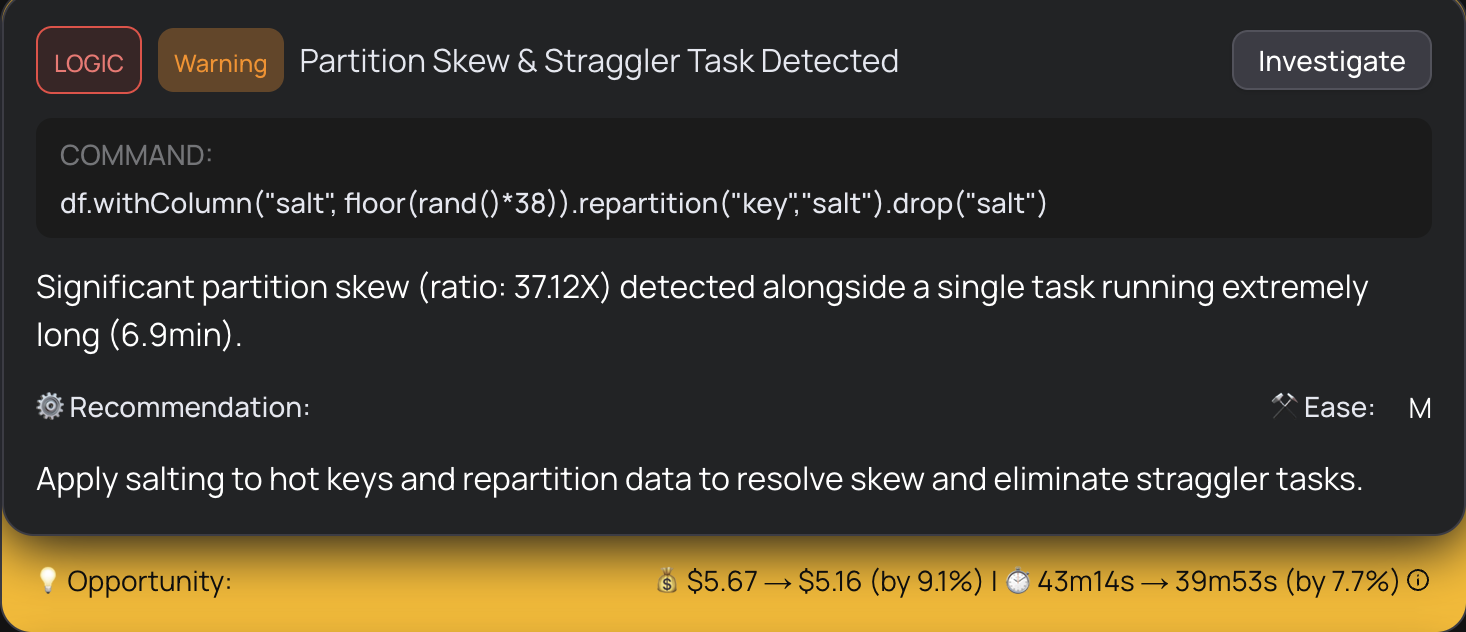
- Skew salting: For stages with inherent data skew (not caused by the coalesce), the team applied salting techniques to distribute hot keys more evenly across partitions, eliminating 6.9-minute straggler tasks. DataFlint detected 37.12x partition skew with one task running 6.9 minutes.
- Memory-optimized instances: They tuned the EMR cluster configuration, moving to r6g memory-optimized instances to better match the workload's memory-heavy profile.
Together with the coalesce fix, these optimizations brought the pipeline well within SLA even during peak traffic.
Epilogue: A Deeper Layer - And Why the Fix Still Mattered
The repartition fix got us back under SLA immediately, but the investigation didn't stop there. Weeks later, we uncovered a deeper layer to the story that made us appreciate the fix even more.
An upstream event producer had started sending an empty string instead of null for the origin_uid field in page view events. Our pipeline uses a final_visitor_key for grouping, which coalesces multiple fields including origin_uid. When this field was null, Spark would fall through to a secondary key, distributing events normally. But an empty string is a valid value, so thousands of events suddenly shared the same group-by key, funneling into a single partition and causing massive skew.
The timing made it especially tricky: the producer change had started just two days before we noticed the SLA breaches, so it overlapped almost perfectly with our own performance changes. It was only by using Iceberg's time travel to inspect historical data that we confirmed the skew predated our code changes.
Here's what's interesting: DataFlint had flagged the partition skew from the start and recommended repartitioning to distribute the workload evenly. That fix didn't just buy us time, it made the pipeline resilient enough to handle the skewed data without breaching SLA. Even with the upstream bug still active, the job ran within its window. Once the producer fixed the empty-string issue, execution time dropped even further. In production, you rarely get to fix every layer at once. DataFlint gave us the immediate fix that kept us running while we tracked down the deeper issue.
Key Takeaways for Data Engineering Teams
This case is a textbook example of why Spark performance problems are so hard to debug with traditional tools. The bottleneck wasn't in our code. It was in a utility method we didn't write, interacting with Iceberg's write path in a way that only manifested under production data volumes. No amount of code review, unit testing, or log reading would have revealed it.
The factors that determine whether an EMR Spark job meets its SLA live outside the codebase: data volume and distribution, partition strategies, storage layer behavior, cluster configuration, and executor memory settings. Code that works perfectly in development can fail spectacularly in production when any of these variables change.
Without a production-aware Spark copilot, this investigation could have consumed days of engineering time: manual Spark Web UI refreshing, log correlation across stages, and trial-and-error configuration changes with no visibility into what was actually happening inside the execution plan.
With DataFlint's Spark agent and production context:
- Root cause analysis took minutes, not days
- The fix was identified and applied the same day as the production incident
- The AI traced through 5 levels of code indirection to find the exact problematic line
- Ongoing optimization opportunities were surfaced automatically across the full pipeline
We didn't just fix the problem. We gained a deep understanding of how coalesce, repartition, and Iceberg's write behavior interact at scale. That knowledge now informs how we design and tune every pipeline going forward.
We are now rolling DataFlint out across our remaining EMR and EKS Spark workloads to map the top optimization opportunities across all teams and domains. The coalesce fix was just the start. With a production-aware Spark agent, every pipeline becomes a candidate for optimization that would have been invisible before.